What Is a Rollout Plan? Guide & Process
A rollout plan is a structured plan for introducing or replacing technologies or processes within an organization. It ensures that all tasks, procedures, and responsibilities are clearly defined and that implementation takes place in a phased, efficient manner with minimal risk to ongoing operations.
Rollouts must be carefully planned. A rollout plan brings together all the key elements for this: objectives, timelines, resources, responsibilities, processes, risks, and documentation. It is typically created by project leaders, rollout managers, or external service providers.
Are you planning a hardware or device rollout? Take advantage of our Rollout-Checklist for Hardware and Devices mit kostenlosem PDF zum Ausfüllen.
What Should a Rollout Plan Include? An Overview of Key Topics
| Subject Area | What Is Defined in the Rollout Plan |
|---|---|
| Objectives and Framework Conditions | Scope, success criteria, and temporal, qualitative, and organizational requirements |
| Project Structure and Process | Rollout units, process, timeline, milestones, phases, and piloting |
| Organization and Resources | Teams, responsibilities, decision-making processes, capacities, and budget |
| Data and Systems | Required data, data ownership, rollout software, access rights, and interfaces |
| Communication and Documentation | Information channels, reporting, training, support, documentation, and acceptance testing |
| Risks and Mitigation | Risks, issues, changes, fallbacks, escalations, and phase gates |
How to Create a Rollout Plan: Step by Step
The STAK model is Rollout Solutions’ practice-based phased model for complex rollout projects. It divides the entire project process into four sequential phases. Here, we’ll focus on the first phase, S—Structuring and Planning—and highlight what’s important when creating a rollout plan.
Define Rollout Goals, Scope, and Success Criteria
The technologies, systems, or devices to be rolled out have already been determined. The rollout plan now specifies where and to what extent the implementation will take place and what results must be achieved. This includes clear guidelines for deadlines, quality, and acceptance.
Define the Project Structure and Implementation Logic
Determine what constitutes the smallest rollout unit in the project—for example, a workstation, a device, or a branch. Then define how these units will be organized and rolled out—for instance, by region, location type, phase, wave, or calendar week.
Verify Data Sets and Clarify Data Responsibility
Verify which location, device, contact, and project data are required and whether this data is complete and up to date. Also specify where the data comes from, who maintains it, and how changes will be handled during the rollout.
Develop the rollout process and checklists
Define the repeatable standard process from preparation through acceptance. Specify tasks, sequences, dependencies, status values,
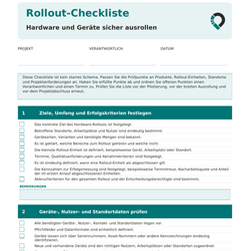
Download the rollout checklist as a PDF
A rollout checklist compiles the most important items to review for planning, executing, and accepting a rollout. These include device data, responsibilities, deadlines, and logistics.
Our free PDF template for hardware and devices covers 16 topics with fields for project details and notes. Fill it out, check off items, and save it directly on your screen—or print it out and fill it in by hand.
Our Rollout Compass provides detailed and structured guidance on rollout planning. You can request the e-book for free below by signing up for our newsletter.
Sample Structure of a Rollout Plan
The following simplified example shows how a rollout plan for replacing 10,000 laptops can generally be structured. It serves solely to illustrate the setup.
Ziel / Objective
Replacement of 10,000 laptops to create uniform working conditions and ensure current security standards across the entire company.
Umfang / Scope
Inclusion of all locations and employees, including planning device distribution, coordinating appointments, as well as the return and processing of legacy devices.
Zeitplan / Timeline
• Structuring and planning: 6 weeks
• Testing and piloting: 4 weeks
• Execution (ramp-up and full rollout): 18 months
• Consolidation and closure: 2 weeks
Ressourcen / Resources
• Central project team (project management, coordination, support)
• Technical teams for device issuance and on-site replacement
• Budget for hardware, logistics, support, and potential external service providers
Vorgehen / Approach
• Structuring and planning of the rollout, including the definition of tranches, location sequence, and timeline
• Execution of a pilot rollout at selected locations to test the planned procedures
• Evaluation of the pilot and adjustment of planning and processes
• Controlled ramp-up and subsequent full rollout across all designated locations, regions, or departments
• Consolidation of open items, final sign-off, handover to standard operations, and creation of the project closure report
Erfolgskriterien / Success Criteria
• Complete replacement and documented acceptance of all 10,000 laptops
• Adherence to the specified schedule, budget, and quality requirements
• Structured tracking and resolution of issues, deviations, and delays
• Evaluation of user feedback regarding execution and acceptance
Common Mistakes in Rollout Planning and How to Avoid Them
Unclear Specifications for Implementation
Challenge:
In many rollout projects, it is clear why the rollout is being carried out – e.g., equipping all employees with new laptops to create uniform standards and increase IT security. What is often missing, however, are concrete specifications for implementation.
Recommendation:
Define clear, measurable specifications for implementation: such as time per device or number of devices per day. This creates clear orientation for the entire rollout.
Insufficient Pilot Phase
Challenge:
The testing phase is often scheduled too short or conducted only superficially. Frequently, the rollout is launched on a large scale directly without testing processes under real-world conditions. As a result, problems only arise during the ongoing rollout and can only be corrected with high effort.
Recommendation:
Conduct a complete pilot rollout under real-world conditions. Test all workflows, identify weaknesses, and optimize processes before scaling the rollout. Then start in a manageable area and expand the rollout step by step.
Unrealistic Resource Planning
Challenge:
Time, personnel, and materials are often insufficiently considered in the rollout plan. It frequently only becomes apparent during implementation that more effort is required per location, not enough technicians are available, or key components are missing.
Recommendation:
Plan resources realistically and with adequate buffers. Take into account differences between locations as well as typical schedule delays. In addition, provide a team and clear processes to quickly address unpredictable problems and keep the rollout running smoothly.
Unclear Processes and Lack of Information Flow
Challenge:
In many rollouts, workflows are not clearly defined. It is often not specified what needs to happen after a completed step – who is informed, what data must be recorded, or what next steps follow. This creates media disruptions, information gets lost, and the rollout grinds to a halt.
Recommendation:
Define clear processes and workflows for the entire rollout. Specify which steps take place in which sequence, what information must be captured, and who is notified when (e.g., automatic notification upon completion of a location). This ensures a smooth flow of information and avoids delays.
Unclear Responsibilities and Lack of Accountabilities
Challenge:
In many projects, it is not clearly defined who is responsible for which tasks. It remains unclear who makes decisions, who solves problems, or who handles support. Furthermore, it is often not specified who needs to be informed in which situations. This leads to delays, duplicated work, or neglected tasks.
Recommendation:
Define clear roles and responsibilities for all stakeholders. Establish who executes tasks, who makes decisions, who is involved, and who needs to be informed. In more complex projects, this can be structured, for example, using a RACI matrix.
Inadequate Tools and Lack of Rollout Software
Challenge:
Many rollouts start with tools like Excel or email coordination. While this often works well at the beginning, it quickly reaches its limits as the project grows. Beyond a certain number of locations, participants, and tasks, management becomes confusing, information can be lost, and coordination effort increases significantly.
Recommendation:
Rely on suitable rollout management tools early on. A specialized rollout solution such as SiteTracker helps to manage the rollout project centrally and maintain an overview of even complex projects.